
iOS developers
AHAP files explained
What is inside an AHAP file, key by key, with six small patterns you can download, read and play in your own app.
What an AHAP file is
AHAP stands for Apple Haptic and Audio Pattern. It is a text file that describes a haptic as data. Apple calls the format “JSON-like”: key-value pairs, much like a dictionary literal written into a file. You add it to your Xcode project like any other resource, an image or an audio file (Apple’s AHAP reference).
Core Haptics is forgiving about what it reads. It sets missing entries to their default values. It clamps out-of-range values to the nearest limit. It ignores keys it does not support.
That forgiveness makes some mistakes quiet. Core Haptics ignores an unsupported key, so a misspelt optional key means the haptic plays without that setting. Read the format key by key once, and you will spot those mistakes.
This article does that with six small patterns. Each one is shown in full below, and each one is a download: single-tap.ahap, swell.ahap, click-and-hum.ahap, rumble-ramp.ahap, sharpness-sweep.ahap and step-down.ahap.
The shape of the file
Apple lists two top-level keys, Version and Pattern. Version is the lowest version of Core Haptics that can load the file. Pattern is an array, and one file holds a single pattern.
Each entry in the array names one of three things. Give each entry a single key, as Apple’s sample files do.
Version             the lowest Core Haptics version that can load the file
Pattern             an array; each entry holds one of:
  Event             a haptic or an audio event
  ParameterCurve    a parameter that changes smoothly over time
  Parameter         a parameter that changes at once, at one moment
Many files also carry a Metadata block. Apple’s reference does not list it. Apple’s own sample files include one, with a project name, a date and a description, and Core Haptics ignores keys it does not support. Haptrix writes a Metadata block too, with the title, description and tags you give a haptic.
All six files below start the same way: "Version": 1.0, then a Metadata block, then Pattern.
Events
An event is a segment of the pattern with a start time and a set of properties. Events can overlap. Every event has a Time, in seconds from the start of the pattern, and an EventType.
| EventType | What it is |
|---|---|
HapticTransient |
A brief impulse at one moment, like the feedback from a toggled switch |
HapticContinuous |
A haptic that lasts, like a sustained buzz |
AudioCustom |
An audio file you supply, played once by default |
AudioContinuous |
A looped audio waveform of any length |
A transient completes on its own, so it needs no duration. A continuous event must have one, because the duration is its endpoint. Apple gives a continuous haptic event a maximum duration of 30 seconds.
Note
Apple’s reference page lists the duration key as Duration. Every Apple sample file that has a continuous event uses EventDuration, and Core Haptics names its key constant after it: CHHapticPattern.Key.eventDuration in Swift, CHHapticPatternKeyEventDuration in Objective-C. Write EventDuration. Our check with Core Haptics on macOS 27.0.1 confirmed that replacing EventDuration with Duration loses the event’s duration on a parse-and-export round trip.
An event’s EventParameters is an array of ParameterID and ParameterValue pairs. Every one is optional, and a missing one takes its default. Two parameters do most of the work in a haptic event.
HapticIntensity, from 0 to 1, is the strength of the event. Think of it as volume.HapticSharpness, from 0 to 1, is its character. Low values feel round and organic. High values feel crisp and precise.
Apple adds a warning about these numbers: a value of 0 does not mean the parameter has no effect. The values are normalised to the minimum and maximum the system supports.
The smallest useful pattern is one transient.
{
  "Version": 1.0,
  "Metadata": {
    "Project": "Haptrix pattern pack",
    "Created": "7 November 2026",
    "Description": "One transient: a single, firm tap."
  },
  "Pattern": [
    {
      "Event": {
        "Time": 0.0,
        "EventType": "HapticTransient",
        "EventParameters": [
          { "ParameterID": "HapticIntensity", "ParameterValue": 0.8 },
          { "ParameterID": "HapticSharpness", "ParameterValue": 0.5 }
        ]
      }
    }
  ]
}
Time 0.0 plays the tap as soon as the pattern starts. Intensity 0.8 makes it firm. Sharpness 0.5 sits in the middle of the range. There is no EventDuration, because a transient needs none. That is single-tap.ahap.
Continuous events and their envelope
For a continuous event that builds and fades, use these event parameters.
AttackTime: how long the intensity takes to reach full strength.ReleaseTime: how long a sustained envelope takes to reach zero after the event finishes.Sustained: 1 for a sustained envelope, 0 for an unsustained one.
Attack and release run from 0 to 1. These are normalised values, so 1 does not mean one second.
The format also has DecayTime for an unsustained envelope. This example leaves it unset and uses a sustained envelope with attack and release, following Apple’s AHAP reference.
This event has a one-second duration and a release tail. The full pattern can therefore last longer than one second.
{
  "Version": 1.0,
  "Metadata": {
    "Project": "Haptrix pattern pack",
    "Created": "7 November 2026",
    "Description": "One continuous event with a slow attack and a long release, set on the event itself."
  },
  "Pattern": [
    {
      "Event": {
        "Time": 0.0,
        "EventType": "HapticContinuous",
        "EventDuration": 1.0,
        "EventParameters": [
          { "ParameterID": "HapticIntensity", "ParameterValue": 0.7 },
          { "ParameterID": "HapticSharpness", "ParameterValue": 0.3 },
          { "ParameterID": "AttackTime", "ParameterValue": 0.4 },
          { "ParameterID": "ReleaseTime", "ParameterValue": 0.5 },
          { "ParameterID": "Sustained", "ParameterValue": 1 }
        ]
      }
    }
  ]
}
Everything in this file belongs to one event, which is the point. An envelope shapes a single event. A curve, which comes next, shapes the whole pattern. That is swell.ahap.
Combining events
Each event starts at its own time, so you can stack them. The most common pair is a click for the moment and a hum for what follows it.
{
  "Version": 1.0,
  "Metadata": {
    "Project": "Haptrix pattern pack",
    "Created": "7 November 2026",
    "Description": "A sharp click, then a soft hum that starts 30 milliseconds later."
  },
  "Pattern": [
    {
      "Event": {
        "Time": 0.0,
        "EventType": "HapticTransient",
        "EventParameters": [
          { "ParameterID": "HapticIntensity", "ParameterValue": 1.0 },
          { "ParameterID": "HapticSharpness", "ParameterValue": 0.9 }
        ]
      }
    },
    {
      "Event": {
        "Time": 0.03,
        "EventType": "HapticContinuous",
        "EventDuration": 0.6,
        "EventParameters": [
          { "ParameterID": "HapticIntensity", "ParameterValue": 0.4 },
          { "ParameterID": "HapticSharpness", "ParameterValue": 0.3 }
        ]
      }
    }
  ]
}
The click is full strength and sharp. The hum starts 30 milliseconds later, soft and round, and runs for 0.6 seconds. That is click-and-hum.ahap.
Give overlapping events different jobs. Core Haptics layers haptics that play at the same time, but they do not blend the way audio waveforms do. Apple’s sample code warns that two events of the same type at the same time are hard to tell apart.
Parameter curves
A ParameterCurve changes a parameter smoothly while the pattern plays. It names a ParameterID, a Time at which it begins, and ParameterCurveControlPoints: pairs of Time and ParameterValue. A point’s Time counts from the start of the curve, and the value moves in a straight line from one point to the next.
A curve uses the “Control” parameter IDs. Two matter most.
HapticIntensityControl, from 0 to 1, is a factor. The event’s intensity is multiplied by it.HapticSharpnessControl, from -1 to 1, is an amount. It is added to the event’s sharpness, and it affects only continuous events.
The result is always limited to the parameter’s own range.
Learn one rule early: a curve belongs to the pattern, not to an event. Apple puts it plainly: “Parameter curves apply to all events in a pattern; it isn’t possible to apply one to only a single event.” To shape one event with a curve, start the curve with that event and keep other events out of its time range. To shape one event on its own, use its envelope.
The first curve here builds a rumble for a second and then drops it.
{
  "Version": 1.0,
  "Metadata": {
    "Project": "Haptrix pattern pack",
    "Created": "7 November 2026",
    "Description": "One continuous event that builds for a second, then drops away, shaped by an intensity curve."
  },
  "Pattern": [
    {
      "Event": {
        "Time": 0.0,
        "EventType": "HapticContinuous",
        "EventDuration": 1.5,
        "EventParameters": [
          { "ParameterID": "HapticIntensity", "ParameterValue": 1.0 },
          { "ParameterID": "HapticSharpness", "ParameterValue": 0.2 }
        ]
      }
    },
    {
      "ParameterCurve": {
        "ParameterID": "HapticIntensityControl",
        "Time": 0.0,
        "ParameterCurveControlPoints": [
          { "Time": 0.0, "ParameterValue": 0.1 },
          { "Time": 1.0, "ParameterValue": 1.0 },
          { "Time": 1.5, "ParameterValue": 0.0 }
        ]
      }
    }
  ]
}
The event’s own intensity is 1.0, so the curve’s value is what you feel: 0.1 at the start, 1.0 after a second, 0.0 at 1.5 seconds. That is rumble-ramp.ahap.
The second curve moves sharpness. Because sharpness is added, a curve from -0.5 to 0.5 over an event with sharpness 0.5 sweeps from 0.0, the roundest end of the range, to 1.0, the crispest.
{
  "Version": 1.0,
  "Metadata": {
    "Project": "Haptrix pattern pack",
    "Created": "7 November 2026",
    "Description": "One continuous event whose sharpness moves from the softest to the crispest end of the range."
  },
  "Pattern": [
    {
      "Event": {
        "Time": 0.0,
        "EventType": "HapticContinuous",
        "EventDuration": 1.5,
        "EventParameters": [
          { "ParameterID": "HapticIntensity", "ParameterValue": 0.6 },
          { "ParameterID": "HapticSharpness", "ParameterValue": 0.5 }
        ]
      }
    },
    {
      "ParameterCurve": {
        "ParameterID": "HapticSharpnessControl",
        "Time": 0.0,
        "ParameterCurveControlPoints": [
          { "Time": 0.0, "ParameterValue": -0.5 },
          { "Time": 1.5, "ParameterValue": 0.5 }
        ]
      }
    }
  ]
}
That is sharpness-sweep.ahap.
Dynamic parameters
A dynamic parameter is a step rather than a slope: it changes a parameter at once, at one moment, across all the events in the pattern. In a file it is a Parameter entry beside your events. It uses the same parameter IDs as a curve, and the same arithmetic: intensity and volume multiply, every other parameter adds, and the result is limited to the parameter’s range.
This event holds full intensity for 0.6 seconds, and then drops to 40 per cent in one step.
{
  "Version": 1.0,
  "Metadata": {
    "Project": "Haptrix pattern pack",
    "Created": "7 November 2026",
    "Description": "One continuous event whose intensity drops at once, halfway through, to a dynamic parameter."
  },
  "Pattern": [
    {
      "Event": {
        "Time": 0.0,
        "EventType": "HapticContinuous",
        "EventDuration": 1.2,
        "EventParameters": [
          { "ParameterID": "HapticIntensity", "ParameterValue": 1.0 },
          { "ParameterID": "HapticSharpness", "ParameterValue": 0.4 }
        ]
      }
    },
    {
      "Parameter": {
        "ParameterID": "HapticIntensityControl",
        "Time": 0.6,
        "ParameterValue": 0.4
      }
    }
  ]
}
That is step-down.ahap.
Core Haptics loads this file and preserves ParameterID, ParameterValue and Time when it exports the pattern again. That checks the file structure; play it on an iPhone to feel the difference between a step and a curve.
Audio in an AHAP file
The format is Haptic and Audio Pattern, and audio is half the name. An AudioCustom event plays a file you supply. Its EventWaveformPath is relative to your app bundle’s root, for example MyAudioContent/Explosion.caf, or the file’s own name.
{
  "Event": {
    "Time": 0.0,
    "EventType": "AudioCustom",
    "EventWaveformPath": "explosion.caf",
    "EventParameters": [
      { "ParameterID": "AudioVolume", "ParameterValue": 0.8 }
    ]
  }
}
That is one entry for the Pattern array, not a whole file. The pack has no audio file because the audio is yours.
Audio events have four parameters of their own.
| ParameterID | Range | What it does |
|---|---|---|
AudioVolume |
0 to 1 | How loud the sound is |
AudioPan |
-1 to 1 | Where the sound sits, left to right |
AudioPitch |
-1 to 1 | The pitch of the sound |
AudioBrightness |
0 to 1 | The high-frequency content of the sound |
By default an AudioCustom event plays its file once, like a transient. Core Haptics also has a key constant that turns looping on, eventWaveformLoopEnabled, which defaults to false. AudioContinuous is synthesised audio with a looped waveform and a duration; it is a different event type from a looping custom audio file. Apple’s HapticBounce sample uses it to put a synthesised sound in the same pattern as a haptic, so one player starts both.
An AHAP path is relative to the top of your bundle. If the audio lives somewhere else, register the file with the engine, using registerAudioResource(_:options:), and build the audio event in code with the resource ID that call returns.
Play a file with Core Haptics
Before anything else, check that the device can play haptics. An iPad, an iPod touch and Apple Vision Pro report that they cannot, and the Simulator plays no haptics either. Test on an iPhone.
Then create one engine, set its handlers, start it, and play the file. Keep the HapticPlayer in a property so its engine stays alive between calls. Add the .ahap files to your app target’s resources and pass a name such as single-tap, without the extension.
import Foundation
import CoreHaptics

final class HapticPlayer {
    private var engine: CHHapticEngine?

    init() {
        // iPad, iPod touch and Apple Vision Pro report false.
        guard CHHapticEngine.capabilitiesForHardware().supportsHaptics else { return }
        do {
            let engine = try CHHapticEngine()
            // Set the handlers before you start the engine.
            engine.resetHandler = { [weak engine] in
                try? engine?.start()
            }
            engine.stoppedHandler = { reason in
                print("The haptic engine stopped, reason \(reason.rawValue)")
            }
            try engine.start()
            self.engine = engine
        } catch {
            print("Haptics are not available: \(error)")
        }
    }

    func play(_ name: String) {
        guard let engine,
              let url = Bundle.main.url(forResource: name, withExtension: "ahap")
        else { return }
        do {
            try engine.playPattern(from: url)
        } catch {
            print("Could not play \(name): \(error)")
        }
    }
}
Start the engine before you call playPattern(from:). If the engine is not running, the system starts it for you, and Apple warns that this can add a significant delay.
playPattern(from:) is fire and forget: once the haptic starts, you cannot stop it. When you need to pause, resume, seek or loop, build a pattern and ask for an advanced player.
import Foundation
import CoreHaptics

@available(iOS 16.0, macOS 13.0, *)
func startLoop(from url: URL, using engine: CHHapticEngine) throws
    -> any CHHapticAdvancedPatternPlayer {
    try engine.start()
    let pattern = try CHHapticPattern(contentsOf: url)
    let player = try engine.makeAdvancedPlayer(with: pattern)
    player.loopEnabled = true
    try player.start(atTime: CHHapticTimeImmediate)
    return player
}
Keep the returned player in a property while it is in use. Call its stop(atTime:) method with CHHapticTimeImmediate to stop the loop. If the engine resets, recreate your players before playing again.
playPattern(from:) has been available since iOS 13. CHHapticPattern(contentsOf:) arrived in iOS 16.
If you build a pattern from events in code instead of from a file, CHHapticPattern has two initialisers that take events: one with dynamic parameters, one with parameter curves. You choose one.
Both examples are compile-checked in Swift 6 language mode with Xcode 27.2. Compilation checks the code; a physical device is still needed to test playback.
An AHAP file plays on an iPhone, or on a game controller whose haptic engine you create with GCDeviceHaptics. It does not play on a Mac’s trackpad, which has three fixed patterns, or on an iPad’s own hardware, which has no Taptic Engine.
Check a file before you ship it
Core Haptics clamps what it can and ignores what it does not know. That is friendly to players and unfriendly to authors, so check a file before it ships.
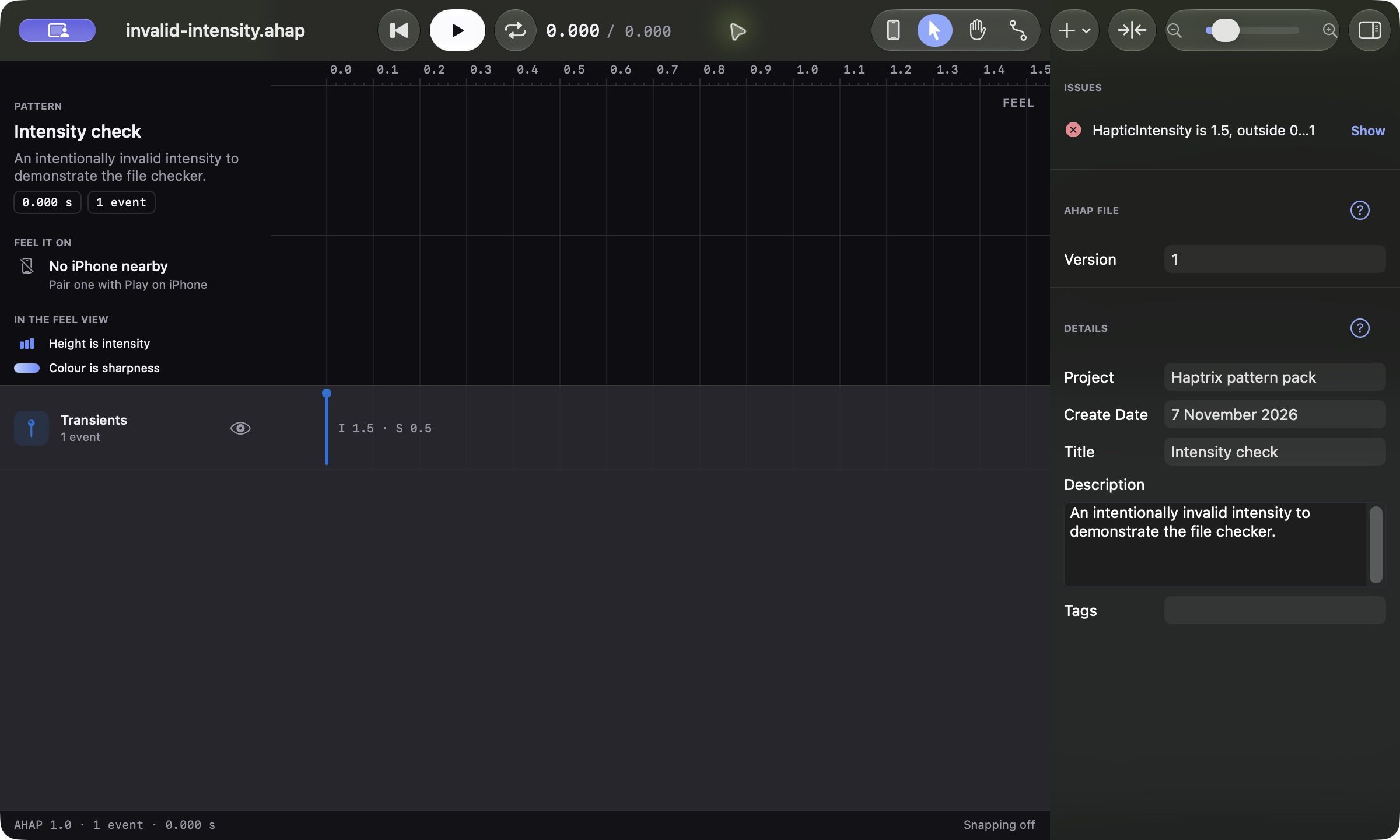
Haptrix runs a checker for this, and the app and the server use the same code. It reports problems such as:
- a value outside its range, for example
HapticIntensity is 1.5, outside 0…1; - a continuous event with no
EventDuration; - an
AudioCustomevent with noEventWaveformPath; - a parameter curve with fewer than two control points.
Open any AHAP file in Haptrix and select nothing. The inspector lists the file’s problems, each marked as an error or a warning. Choose one and Haptrix selects the event it names. The server runs the same check again when you publish a haptic.
Keys Core Haptics does not know
Because Core Haptics ignores keys it does not support, a tool can add its own. Haptrix does. It saves a name you give an event in a Name key, and it writes the Metadata block described above.
When Haptrix opens a file with keys it does not recognise, such as your own notes or keys another tool wrote, it keeps them and writes them back when you save. Opening a file in Haptrix does not strip it.
Where to go next
Open the six files in Haptrix and change them. Move a point, change a sharpness, add a second event, and play the result on your iPhone. Designing haptics without writing code shows that loop from start to finish.
For the Core Haptics side, Apple documents playing a pattern from a file and changing haptic parameters during playback. The help pages cover events, parameter curves and the AHAP format.
More to read
Design haptics in Haptrix
Free, for Mac, iPad and iPhone: the editor, export and publishing included.
New articles by email
Email updates are not switched on yet.